
The program
WARP and HMS
There are two different obstacles between you and a site. The provider that will not let you reach it — that is the bypass. And the site itself, which does not trust your address — that is WARP. And if the site refuses you by country, that is HMS: a chain that brings you out in another country.
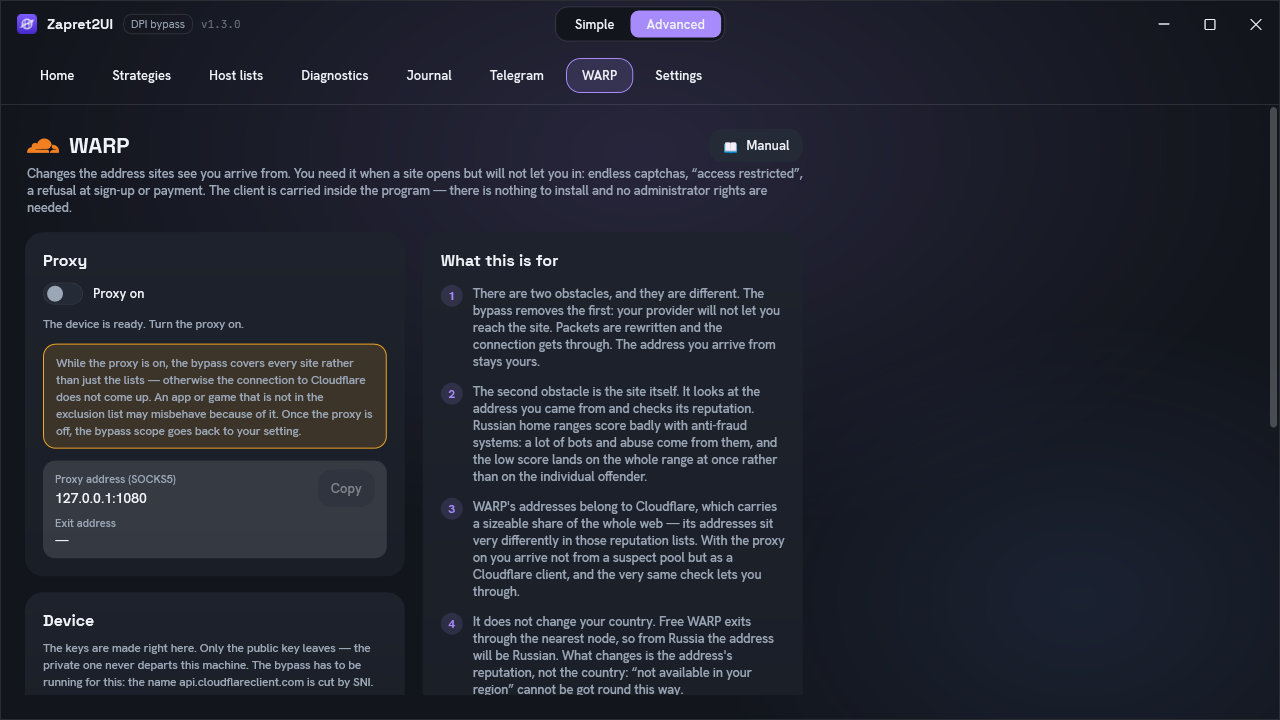
What it gives you
The first obstacle is your provider. It tears the connection down the moment the site's name becomes visible. That is the bypass's job: packets are rewritten so the name cannot be recognised, and the connection gets through. The address you arrive from stays yours.
The second obstacle is the site itself. The connection arrived, the site answered — and refused. The reason is not in the packets but in the address: the site looks at where you came from and checks that address's reputation.
Anti-fraud systems keep reputation for whole ranges, not for individual addresses. Russian home ranges score badly in those lists: a lot of bots, credential stuffing and abuse come from them, and the low score lands on the entire range at once rather than on the actual offender. From your side it looks like this:
- a captcha that never ends, however many you solve;
- "access restricted" or "we could not process your request" out of nowhere;
- a refusal at sign-up, at sign-in or at payment;
- the site opens, but some of its features stay unusable.
Your provider has nothing to do with it — it let you through, and the bypass is useless here: there is nothing left to push through.
Cloudflare gets you in because WARP's addresses are its own. A sizeable share of the whole web passes through its network, and in those reputation lists these addresses sit very differently from subscriber ones: this is not a "suspect home pool" but infrastructure that already carries an enormous flow of ordinary users. With the proxy on you arrive not from a bad range but as a Cloudflare client — and the very same check that refused you lets you through.
| What you see | What to turn on |
|---|---|
| The site does not open at all, the connection drops | The bypass |
| The site opens but will not let you in: captcha, refusal, "access restricted" | WARP |
| "Not available in your country or region" | HMS — a chain through Tor or your own proxy |
The bypass and WARP do not get in each other's way — they are needed together, because
Cloudflare has to be reached in the first place. Registering a device goes to
api.cloudflareclient.com, a name that is cut by SNI, and the MASQUE connection
itself is under pressure from the provider too. So the bypass has to be running.
What it does not
WARP by itself does not change your country. What changes is the address's reputation, not the country. Free WARP is anycast: you land on the nearest Cloudflare node, not one you chose. From Russia the nearest node is Russian, and so is the exit address.
Measured, not assumed: every run came out on 104.28.x.x, country RU, city
Chelyabinsk, node DME. An independent geo database labels those addresses
Cloudflare WARP and flags them as a proxy. So a service closed to Russia will see
Russia, and a service that blocks VPNs will see the proxy flag.
No setting and no other entry point picks the country: MASQUE has only two IPv4 entry points
(162.159.198.1 and 162.159.198.2) plus four over IPv6, and they all land
on the same nearest node. But the exit country follows wherever the connection to Cloudflare came
from — and HMS is built on that.
Turning it on
Before you switch it on: along with the proxy, the bypass scope widens to every site — otherwise the connection to Cloudflare does not come up. The bypass then applies to all TLS/QUIC except the exclusion list, and an application or game that is not excluded may misbehave because of it. Your setting in Настройки (Settings) does not change and comes back as soon as the proxy is off.
-
Start the bypass
Registering a device is an ordinary HTTPS request to
api.cloudflareclient.com, and that name is cut by SNI. The engine covers it unconditionally, whatever the bypass scope — but only while it is running. Without the bypass the request may simply never arrive. -
Press «Create device»
The keys are made on your computer. Only the public key leaves — the private one never departs the machine. Cloudflare answers with a licence and an address inside its network.
-
Flip the «Proxy on» switch
The program starts a local proxy and checks that it works: it asks Cloudflare, through that same proxy, where it sees you. Success is not reported until the answer comes back. The status line then shows the exit address and its country.
Where to point it
The proxy intercepts nothing and changes nothing about the system. Only what you point at it goes through it — a deliberate choice: a failure here cannot leave you without internet.
The address is shown on the tab with a «Copy» button beside it. By default it is
127.0.0.1:1080 and the protocol is SOCKS5.
| Where | How |
|---|---|
| Firefox | Settings → General → Network Settings → «Manual proxy configuration» → SOCKS host
127.0.0.1, port 1080, SOCKS v5. |
| Chrome, Edge | They have no proxy settings of their own and take the system ones. Easier to launch with
--proxy-server="socks5://127.0.0.1:1080" or use a switcher extension. |
| Telegram | Settings → Data and Storage → Proxy → add a SOCKS5 entry with the same address and port. |
The proxy listens on 127.0.0.1 only — nothing on your local network can reach it.
That is deliberate: the client's own default is to listen on every address, which on a shared
network would be an open route to the internet under your account.
What happens inside
WARP speaks two transports. The first is plain WireGuard. The second is MASQUE, Cloudflare's own design: an IP tunnel over HTTP/3, falling back to HTTP/2 over ordinary TCP when QUIC does not get through. On port 443 it is indistinguishable from normal web traffic.
The program uses MASQUE, and not as a matter of taste. WireGuard to WARP is cut at the stream level on Russian networks: the handshake is let through and the data after it is dropped. A desync cannot mend that — it can only disguise a connection's first packet, and there is nothing to hide a continuous stream behind.
The program works out how to connect by itself and remembers what succeeded: HTTP/2 over TCP on 443 first, then 4443, 8443, 500, then QUIC with a capped initial packet. Measured on a Russian network: with the bypass running, 443 connects first try; with it stopped, 443 and 8443 are cut moments after connecting and only 4443 survives. One more reason to leave the bypass on.
The MASQUE entry-point addresses (162.159.198.1 and 162.159.198.2) are
covered by the engine unconditionally, whatever the bypass scope — through a separate
profile driven by lists\ipset-masque.txt. It has to be: without it the connection
only came up with the scope set to every site, and nobody would think to connect those two
things. The profile is aimed at exactly two addresses and touches nothing else.
That profile alone is still not enough: measured on a Russian network, the connection only came up when MASQUE was handled by the whole strategy. So for as long as the proxy runs, the bypass scope is widened to every site — with all the consequences set out under Turning it on. The saved setting is not rewritten: the program overrides it while the proxy is up and lets go once it is off.
Options
| Option | What it does |
|---|---|
| Proxy port | Which port to listen on. 1080 by default — the conventional SOCKS port, and
therefore often already taken by something else. If it is, the program says so plainly
instead of failing silently. A change applies after switching the proxy off and on. |
| Send all system traffic through it | Off by default. While WARP is on, the proxy address is written into Windows' own proxy settings, and Chrome, Edge and most ordinary applications pick it up — there is nothing to fill in. The setting is applied only after the connection has been verified, and is removed when WARP is switched off, when the program exits and on a settings reset; if the program crashed, the previous value is put back on the next launch. |
| Create device | Registers a device with Cloudflare. Available while no device exists. |
| Recreate | Forgets the current device and enrols a new one. Useful if Cloudflare stops serving the old one. |
Firefox does not read the system setting — it needs the address filled in by hand, as in the table above. And bear in mind that everything goes through Cloudflare: games, messengers, downloads. That is a detour where none is needed, which is why the switch is off by default.
HMS: changing the country
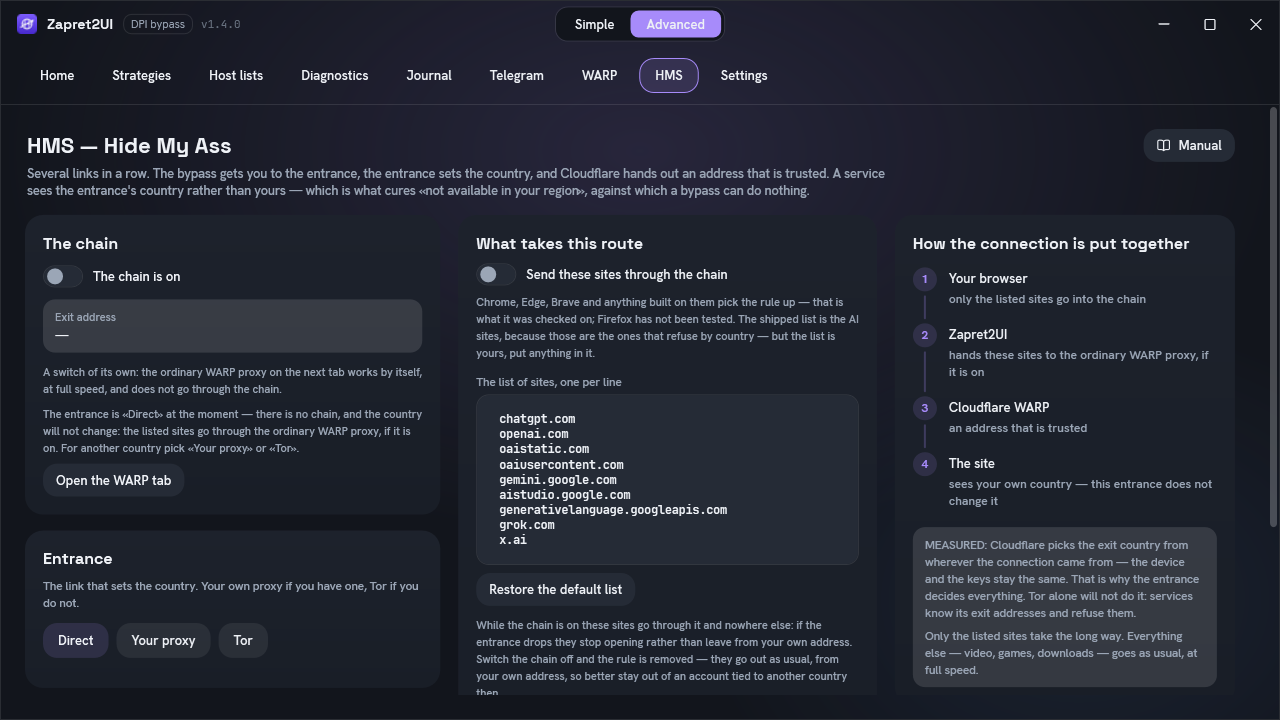
HMS is the tab between WARP and Settings; the community picked the name: Hide My Ass. It is a second connection to WARP, dialled not directly but through an entrance in another country. Measured: Cloudflare picks the exit country from wherever the connection came from — the device and the keys stay the same. Connect from Germany and the exit is German. That is what cures "not available in your region", against which both the bypass and plain WARP are powerless.
-
Your browser
By a Windows rule only the listed sites go into the chain. Everything else goes as usual, at full speed.
-
Zapret2UI
Takes these sites and passes them on. With Tor it also helps the bridges through with the bypass — the provider cuts them; your own proxy reaches its server by itself.
-
The entrance
A bridge and Tor exiting in the chosen country — or your own SOCKS5 proxy (a VLESS or Shadowsocks client). This is the link that sets the country.
-
Cloudflare WARP
An address that is trusted: the service sees a Cloudflare client, not a Tor exit it knows and refuses.
-
The site
Sees the entrance's country, not yours.
Turning it on. Create a device on the WARP tab — one serves both tabs. On the HMS tab choose
the entrance: "Свой прокси" (Your proxy — a SOCKS5 address such as 127.0.0.1:10808,
with a login socks5://user:password@host:port) or "Tor" (a country code such as
de). For Tor press "Получить мосты" (Get bridges) and "Проверить скорость" (Check
speed), and optionally "Подобрать выход" (Choose an exit). Then turn on "Цепочка включена" (Chain
on) and "Вести эти сайты через цепочку" (Send these sites through the chain).
The first time, the program downloads Tor — 21 MB, checked against its checksum. The Tor site is blocked in Russia, so it is fetched through WARP itself: WARP is raised directly, the download goes through it, and only then does the chain go through Tor. The bypass on the Home tab has to be running — while a chain through Tor is on it covers every site rather than just the lists, or the bridges do not connect.
Bridges and the exit node
Bridges come with one button or from the @GetBridgesBot bot in Telegram; a fast exit node is measured and pinned by the program itself.
"Получить мосты" asks the Tor Project for bridges — no captcha, the same request Tor Browser's "Connection Assist" makes — and also looks for ordinary Tor relays that answer from your network. Any relay can be named as a bridge (the ValdikSS/tor-relay-scanner idea). Such relays carry no obfuscation and are often faster than bridges: measured, 9 of 9 brought Tor up, median 5.4 Mbit/s, best 20.6 — against 3.2 for a live obfs4 bridge. Where the provider blocks Tor by protocol they will not get through, and obfs4 and webtunnel are the fallback.
"Проверить скорость" brings up every line of the box in turn, however many there are, and
rewrites the box: the fast ones on top, each with a comment such as
# 12.5 Mbit/s, first byte 1.2 s, the dead ones at the bottom with the reason. Nothing is
deleted. Tor takes the first 12 lines of the box — which is why the fast ones move to the top. You can still paste your own lines — the
@GetBridgesBot bot in Telegram hands them out, command /webtunnel.
"Подобрать выход" measures the country's ten widest exits by the consensus and pins the best one by address. Without a pin Tor takes a new node for every connection, and the WARP address moves with it — to a service that is a new visitor every time.
Measured: exits with nearly identical advertised bandwidth differed fifteenfold in real speed — 11.0 against 0.7 Mbit/s. With a pinned exit the program opens a second connection to Cloudflare: both share one address, so the country cannot drift — 3.6 → 5.5 Mbit/s. If the pinned node stops answering, the program falls back to any node in the country, opens one connection instead of two and says so in the journal.
Which sites take the chain
The list is edited by hand, one domain per line. The shipped one is ChatGPT, Gemini and Grok: those
are the ones that refuse by country. A domain covers everything under it: openai.com is
also api.openai.com. The rule is written into Windows' settings while the chain is on;
Chrome, Edge, Brave and anything built on them pick it up — that is what it was checked on; Firefox
has not been tested.
- While the chain is on, these sites go through it and nowhere else. If the entrance drops they stop opening rather than leave from your own address. Switch the chain off and the rule is removed — they go out as usual, from your own address, so better stay out of an account tied to another country then.
- Exceptions go around the chain even when the list covers them. Measured: the
grok.compage makes 219 requests, and 188 of them go tocdn.grok.com, where a country means nothing. - Speed: through Tor it measured 2–6 Mbit/s with about a second of latency. Fine for a conversation, noticeable for files — which is why the list is kept short.
This does not insure an account. The services' own rules still apply, signing up for Claude asks for a phone number from a supported country, and a sudden change of country can get an account reviewed. Changing the address answers "they will not let me in", not "am I allowed".
Where things live
The usque.exe client is unpacked into C:\Program Files\Zapret2UI\masque: it
runs with administrator's rights, so it lives where it cannot be swapped. config.json with
the device key, its licence and token is in your own profile, in
%LOCALAPPDATA%\Zapret2UI\masque.
Tor for HMS lives in C:\Program Files\Zapret2UI\tor: tor.exe, the
pt\lyrebird.exe transport with pt_config.json, the geoip and
geoip6 databases and torrc. The data folder with the cached
consensus — which is also where exits and ordinary relays are picked from — is in
%LOCALAPPDATA%\Zapret2UI\tor\data. It is downloaded the first time the chain is switched
on through Tor.
The client runs as a child process of the program. If the program crashes, a proxy left behind is cleared away on the next start.
If it does not work
| What you see | What to do |
|---|---|
| The device could not be created | Registration goes to api.cloudflareclient.com, and that name is cut by SNI.
Start the bypass and try again: the engine covers that domain unconditionally, whatever the
scope. If it still fails, Cloudflare moves its client API version from time to time — check
for a newer build of the program. |
| «No way of reaching Cloudflare worked» | Every transport and port was tried. Make sure the bypass is running — without it only port 4443 gets through, with it 443 connects immediately. Check too whether another VPN is up. |
| «Port is already in use by another program» | Something else is sitting on 1080. Put a free port in «Options». |
| «Cloudflare answers but says the traffic is not going through WARP» | The request left the machine outside the proxy. That usually means another tunnel is up and capturing the routes. |
| The proxy is on but a site still says «not available in your region» | Expected: free WARP exits in Russia. The country is changed by HMS. |
| HMS: Tor does not come up, or stalls on one percentage | The bridges are not answering. Press "Получить мосты", then "Проверить скорость"; the bypass on the Home tab has to be running. A stalled Tor is restarted once by the program itself. |
| HMS: «the exit came out in … but you asked for …» | Tor did not hold the country, and the proxy was stopped rather than take you somewhere you did not choose. Try again or pick another country. |
| HMS: «the pinned Tor exit is not answering — taking any one in that country» | The pinned node went away. The chain carries on through any node in the country, over one connection; press "Подобрать выход" again. |
| HMS: the listed sites do not open | The chain is on but its entrance stopped answering (Tor or your proxy), and these sites are not let around the chain. Switch the chain off and on. If the program crashed, start it again: it puts the Windows setting back. |
| The browser ignores the proxy | Check that the address is entered as SOCKS5 and the port matches the one on the tab. Chrome and Edge have no proxy settings of their own — they need a launch flag or an extension. |
| Everything got slower | Expected: traffic takes a detour through Cloudflare. Keep the proxy on only when you need it. |